
ChatGPT Personalisation Settings that Sound Human
If your drafts sound stiff or overly polite, the fix is not longer prompts. It’s better personalisation.
Treat ChatGPT like a new team member: give it a smart induction and a simple style guide, and you’ll save time on every draft.
This article focuses only on the three sections you can use to personalise ChatGPT. You’ll fill in a downloadable template, then come back here to run quick checks and a test.

Before we get into the ChatGPT Personalisation template, make sure your content can be found. Download my free guide: ‘5 Google Search Secrets No SEO Agency Will Tell You’. It covers the core search essentials that help your personalised copy reach the right people.
How this works (at a glance)
1) Download the template and fill it in offline.
2) Come back to this blog and run the length check in a normal chat.
3) Paste each section into your Personalisation settings once it’s under the limit.
4) Open a new chat to run the voice calibration and a quick test draft.
5) If needed, update your Personalisation with any improved rules and save.The Difference Between a Site That Ranks and One That Doesn't
Where to find Personalisation in ChatGPT
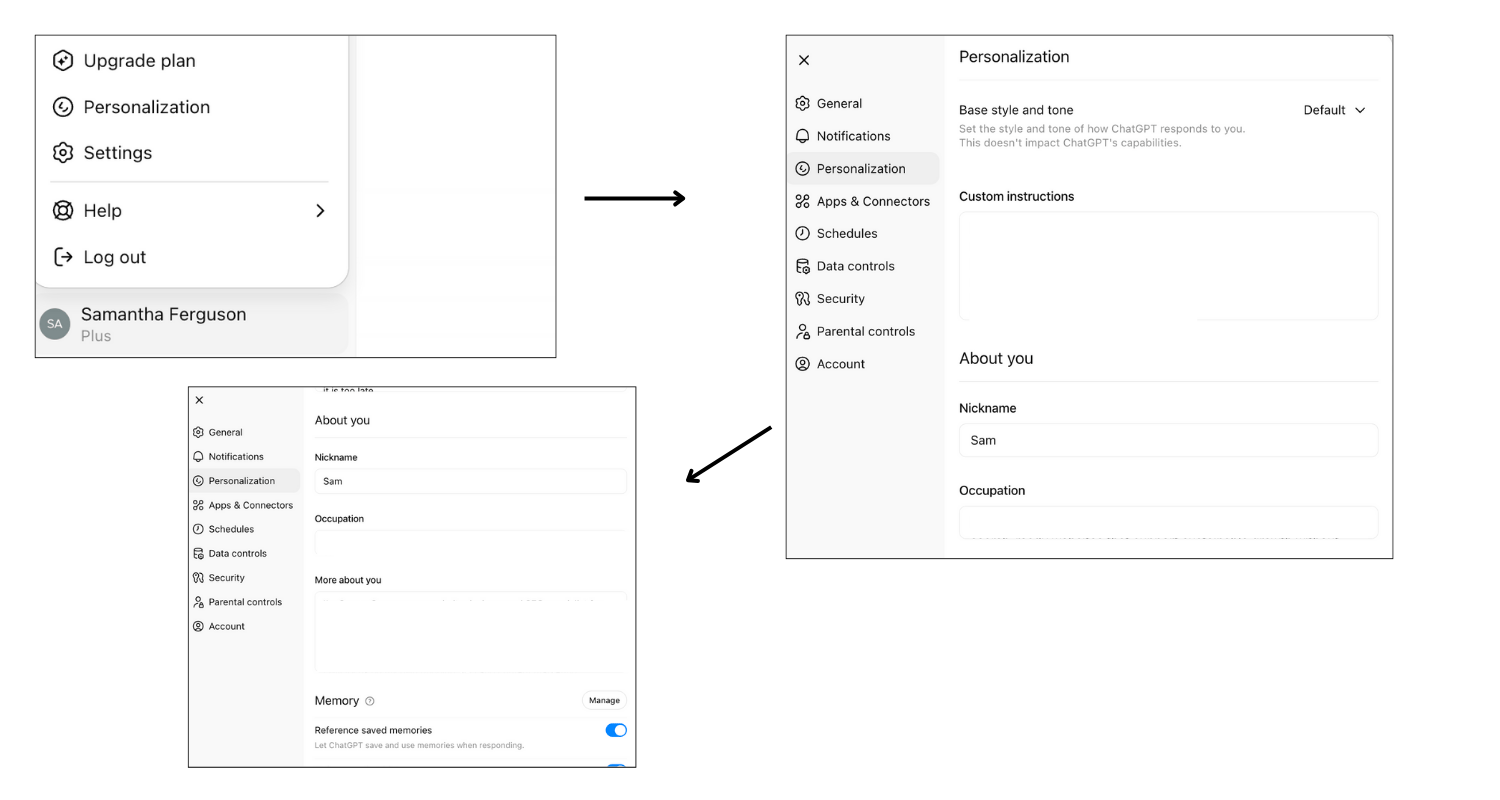
Open ChatGPT → Settings → Personalisation (or ‘Custom instructions’ on some accounts). Paste each finished section into the matching field and click save.
Download template here ↓
The downloadable file contains ONLY the template sections you need to fill in: 1) Custom Instructions, 2) Occupation, and 3) More About You (writing habits).
Copy and Paste version here ↓
ChatGPT Personalisation Template (UK English)
(Fill this in, stay within the character budgets, then paste into your ChatGPT Personalisation settings.)
How to use this:
1) Make a copy.
2) Replace everything in [square brackets] with your details.
3) Delete example lines in italics.
4) Keep each section under its character budget (hard cap 1,500; aim under 1,400).
1) Custom Instructions — Target 1,200–1,400 (max 1,500)
About my practice and audience
• I run a [practice type] supporting [your audience] in [location or ‘online’].
(Example: I run a nutritional therapy practice supporting women with IBS and perimenopause, online across the UK.)
Tone and language
• Tone: [e.g., warm, clear, professional, strategic].
• Use UK English for spelling and punctuation.
• Prefer short sentences and plain English.
Quality guardrails
• Avoid hype, clichés, filler, hedging and over‑polite phrasing.
• Stay accurate and ethical. Provide general education, not personalised medical advice.
• If health claims appear, add a caution to seek personalised care.
Formatting
• Use clear headings, short paragraphs and bullet points where helpful.
Punctuation preference
• Em dashes: [use sparingly] or [avoid]. If a sentence is long, split it.
Voice calibration
• When I paste my own writing, extract my voice rules and apply them in current and future chats.
If you are over 1,400: remove duplicate ideas, merge related bullets, and tighten wording (for example, ‘in order to’ → ‘to’).
2) Occupation — Target 400–600 (max 1,500)
• Occupation: [e.g., Nutritional Therapist / Functional Medicine Practitioner / Health Coach / Clinic Owner]
• Typical tasks: [e.g., write blogs, client resources, email newsletters, service pages, handouts]
• Audience: [e.g., women 30–55, UK‑based, health‑conscious, time‑poor]
• Goals: [e.g., educate, build trust, answer questions with care, invite enquiries or bookings]
• Constraints: no diagnosis; no personalised advice; no sensitive client data
Trim tactics: list only the tasks you truly do; keep audience and goals to the essentials.
3) More About You (writing habits) — Target 500–700 (max 1,500)
• Writing habits I use: [e.g., friendly asides in brackets, clear subheadings, simple everyday analogies]
• Phrases I say often: [add 3–5 you naturally use]
• Phrases I avoid: [add 3–5 you dislike]
• Examples or metaphors I like: [e.g., kitchen, garden or training analogies]
• Signature sign‑off: [e.g., ‘Warmly, Name’]
• House style notes: [e.g., keep intros short, lead with the outcome, finish with one clear CTA]
Trim tactics: keep lists tight, remove any habit covered by your Tone, and avoid repeating the same rule in two places.
Want to use the ready-made document? Use the form above and get a Google doc link straight into your inbox.
Length and voice checks - where and how
Where to do this: Open a new chat with ChatGPT. You’ll run the length check for each section here. Then you’ll run the voice calibration in a separate fresh chat.
A) Length check for each section
Run this once for Custom Instructions, once for Occupation, and once for More About You.
Prompt (copy/paste):
Count the characters in the text between the lines and reply with the number only.
<<<
[PASTE ONE COMPLETED SECTION HERE]
>>>
If the count is above 1,400 (hard cap 1,500), trim and re‑check. Tighten wording: ‘in order to’ → ‘to’; ‘that are’ → ‘that’; merge duplicate bullets. When all three are within budget, paste them into your Personalisation settings and save.
B) Voice calibration (new, fresh chat)
1) Paste a short paragraph of your own writing.
2) Ask:
Extract my voice rules. Summarise tone, sentence length, common phrases and formatting habits in bullets I can add to my personalisation. Keep your answer under 300 characters.
3) Keep the best three to five rules and add them to More About You (and, if helpful, Custom Instructions).
4) Start another fresh chat and test:
Using my personalisation, write two alternate opening paragraphs for a blog on [topic]. Keep each to two sentences.
5) If the updates improved the voice, add those rules to your Personalisation so they stick.
Common pitfalls and quick fixes
• Still sounds generic — Add who you help, where you work, what you write, and the exact tone you want. Prioritise these over nice‑to‑haves.
• Keeps switching to US spelling — Include ‘Use UK English’ in your settings and repeat it in the first message of a new chat.
• Too formal — Add: ‘Plain English. Short sentences. Friendly, practical voice. Avoid hedging.’
• Strays into health claims — Set guardrails: ‘No medical claims. Education only. Encourage readers to seek personalised care.’
• Too many em dashes — You do you. If they’re part of your voice, keep them with intent. If not, go sparse or avoid. State your preference in Custom Instructions.
Ready to try this?
1) Copy and paste the template above into a new document, or download the template file here.
2) Fill it in offline.
3) Come back to this blog and run the checks in a normal chat.
4) Paste into your Personalisation settings and save.
5) Run the voice calibration and a quick test draft. Refine if needed and you’re done.
Quick FAQ
Where do I run the checks?
In a normal chat. Personalisation is where you store the finished rules.
Do I do any of this inside the Personalisation fields?
Only the final paste-and-save. All counting, extracting and testing happens in a regular chat.
Why separate chats?
Fresh chats pick up your latest Personalisation cleanly and avoid old context muddying results.
Make the most of your new Personalisation by ensuring your content can be found. I’ve created a free guide that shows you how to fix the five search basics on your Squarespace site. You’ll see where to find the settings, what to change, and why it matters, with clear screenshots.
Grab it here: 5 Google Search Secrets No SEO Agency Will Tell You (And You Can't Afford to Ignore)
If you currently rely on social media to be discovered, you are likely working much harder than you need to. Fix these five things first, then build from there.
If you’ve found this blog helpful, you might like to read these popular titles:
How to Use ChatGPT for Marketing (Does Google Care?)
What Are AI Snippets? 7 Reasons Health Practitioners Need to Care in 2025
Sam Ferguson is a website designer and SEO specialist for nutritionists, functional medicine practitioners, and women in wellness. With a unique blend of industry insight and technical expertise, Sam helps clients create impactful websites that attract, engage, and convert. When she’s not designing, you’ll find her sharing practical digital marketing tips to help wellness professionals grow their online presence with confidence.